Creation Tools
Creation Tools Guide
The panel is easier to understand if you read it in two layers: first the creation buttons, then the editing controls that appear after a valid Volume Forge object is selected.
How the panel is organized
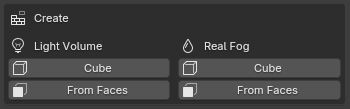
The top of the panel is the Create section. It always shows two columns: Light Volume and Real Fog, each with a Cube button and a From Faces button.
Once a valid volume is selected, the editing sections appear below it. If nothing valid is selected, the panel shows No Volume Selected and keeps only the creation tools visible.
The four creation buttons
- Create Light Volume (Cube) — Fast stylized light volume, no selection preparation required.
- Create Light Volume (From Faces) — Light volume built between two selected quad faces. The first selected object defines the source side (A) and the second selected object defines the target side (B).
- Create Real Fog (Cube) — Fog volume created at the 3D Cursor, useful for localized atmosphere.
- Create Real Fog (From Faces) — Fog volume guided by scene geometry, using the same selection logic as the light version.
For both Real Fog buttons, remember that the volume is not emissive. It needs light in the scene to become clearly visible.